Automation is no longer just about “connecting two apps.” In 2026, a good tool must be able to:
- orchestrate multi-step workflows (APIs, databases, files, notifications),
- integrate LLMs / AI (summarization, classification, extraction, agents),
- stay maintainable (logs, error handling, versioning),
- and meet your constraints (self-hosting, security, compliance).
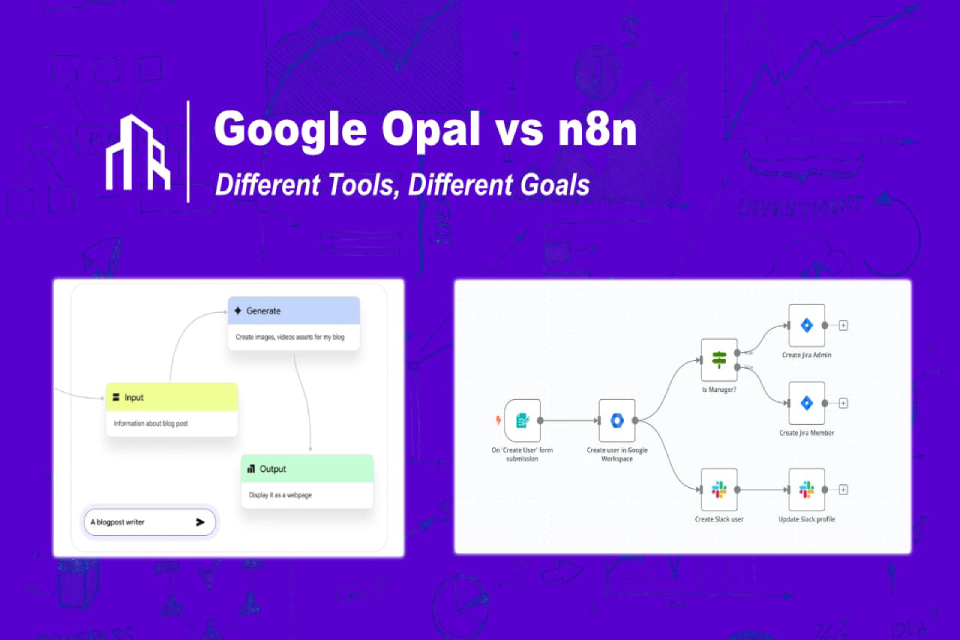
Two names come up often among technical profiles: n8n and Opal. But they do not play in exactly the same category:
- Opal is a no-code builder geared toward “AI mini-apps” (prototyping, quick apps). (developers.googleblog.com)
- n8n is a low-code automation platform built for technical teams, with infrastructure control and advanced logic. (n8n)
The goal of this article: to help you, as a developer or integrator, choose quickly and well — and sometimes combine the two.
1) Opal: “prompt → mini-app” AI automation (ultra simple)
Opal (Google Labs) lets you describe what you want in natural language. The tool then generates a visual workflow and a shareable mini-app in a few minutes. Its main strength: prototyping speed and accessibility. (developers.googleblog.com)
What Opal does very well
- Prototype an idea for an AI agent or assistant (summarizer, generator, extractor) without coding. (developers.googleblog.com)
- Create ready-to-share mini-apps (useful for demos, PoCs and business teams). (opal.google)
- Start from a gallery of templates and customize quickly. (opal.google)
The limits to know (on the integration side)
For an integrator, Opal is often perfect for the AI front end (the interface and the “visible” AI logic), but it becomes more limited as soon as you need:
- complex business logic (advanced branching, retries, compensation),
- custom integrations (internal APIs, specific databases),
- strict control (network, secrets, compliance, deployment).
In short: Opal is excellent for “demonstrating and packaging” an AI idea.
2) n8n: professional automation for technical teams (low-code + control)
n8n positions itself as an automation platform for technical teams, combining drag-and-drop with “pro-code” capabilities, with self-hosted or cloud options. (n8n)
Why developers like n8n
- Complex workflows: conditions, branches, error handling, retries, alerts and more. (n8n)
- Connectors + extensibility: nodes, webhooks, API calls and custom logic. (n8n)
- Deployment: you can host it according to your own rules (Docker, on-prem or cloud). (n8n)
- AI / LLM orchestration: integration through OpenAI-compatible APIs, support for multiple providers and even local LLMs (for example via Ollama). (n8n)
In short: n8n is an “orchestration engine,” ideal when automation becomes a system (not just a scenario).
3) Opal vs n8n: quick comparison (an integrator’s view)
| Criterion | Opal (Google) | n8n |
|---|---|---|
| Purpose | Fast AI mini-apps | Business workflows & data orchestration |
| Level | No-code | Low-code + pro-code |
| Time to value | Very fast | Fast, but calls for more structure |
| Complexity | Medium | High (branches, errors, patterns) |
| Infrastructure control | Hosted / abstracted | Self-hosting possible + control |
| Ideal profile | PMs, ops, marketing, PoCs | Developers, integrators, IT, product |
4) The winning combo: Opal as the “AI front end,” n8n as the “automation backend”
Many technical teams end up keeping things simple and effective:
- Opal is used to build the AI tool (interface + prompts + outputs),
- n8n picks up the output through a webhook and triggers the automation (CRM, database, emails, tickets, dashboards…).
This “Opal → webhook → n8n” setup is often presented as the best of both worlds: simplicity on the user side, robustness on the system side. (scalevise.com)
Concrete examples (in high demand)
- “Lead triage” assistant: Opal summarizes and classifies a lead → n8n enriches it (Clearbit or internal database), creates a CRM opportunity and notifies Slack.
- Customer review analysis: Opal extracts themes and sentiment → n8n feeds a spreadsheet or database and creates tickets by priority.
- Support: Opal rewords the request and suggests a reply → n8n posts it to Zendesk/Freshdesk, logs it and tracks KPIs.
5) The non-negotiables in 2026 (developer/integrator checklist)
A) Observability & operations
A workflow that “runs” but that you cannot diagnose is immediate technical debt.
n8n puts strong emphasis on debugging and monitoring, alerting and the test → deployment cycle. (n8n)
What to require:
- usable logs,
- clear error handling (fallback, retry),
- incident notifications,
- traceability (who did what, and when).
B) Security: watch out for “code” nodes
An important and very topical point: a critical vulnerability was reported in n8n (Python/Pyodide node) and fixed through an update (with a change of implementation and sandboxing, depending on the version). The lesson: if you self-host, set up a patching process and restrict editing permissions. (TechRadar)
Quick best practices:
- separate environments (dev/staging/prod),
- limit who can modify workflows,
- keep secrets in a vault or in environment variables,
- update regularly and review “code” nodes.
C) Real costs
- Opal: the cost is mostly “product/usage” (you save development time).
- n8n: if you self-host, it is “free” on the license side, but you pay for infrastructure and operations (monitoring, backups, updates). Comparisons often point out this “hidden cost” of self-hosting versus managed cloud. (Zapier)
6) Clear recommendations by profile
You are an IT integrator or freelance developer (SME and mid-market clients)
Choose n8n if you need to deliver robust automations (CRM/ERP, ETL, alerting, multi-system workflows). (n8n)
Add Opal as an option to give business teams a “clean” AI mini-app (collection, summarization, qualification). (Google for Developers)
You run AI PoCs or product innovation
Choose Opal to iterate fast, demo a mini-app and collect feedback. (developers.googleblog.com)
Then move production to n8n when it becomes critical (SLAs, compliance, internal connectors). (n8n)
You want something “simple but powerful” for developers
The most common answer: n8n (powerful) with a UI layer (Opal or another tool) when needed.
7) FAQ (SEO)
Is Opal an automation tool like Zapier?
Opal is closer to a no-code AI mini-app builder than to a classic SaaS integration engine. (developers.googleblog.com)
Is n8n suited to AI workflows?
Yes. n8n highlights AI orchestration and integration through compatible APIs (and even local LLMs, depending on the configuration). (n8n)
Can you use Opal and n8n together?
Yes: Opal for the AI app, n8n as the execution engine through webhooks and integrations. (scalevise.com)
Self-hosting n8n: what is the main risk?
The main risk is running a poorly maintained instance (updates, permissions, “code” nodes). A recent vulnerability illustrates the importance of patching and access controls. (TechRadar)
Conclusion
- Opal: perfect for “prompt → AI mini-app” and ultra-fast prototyping. (developers.googleblog.com)
- n8n: the best choice when you want a robust automation tool for developers and integrators, with control and complex workflows. (n8n)
- The best option in real life: often Opal + n8n (simplicity on the user side, solidity on the IT side). (scalevise.com)